
ENGINEERING GUIDE · PX4 / ARDUPILOT
By SkyPulse Technologies Ltd. · Prepared 2 October 2026 · Documentation-based guide; not a report of comparative flight testing.
Choose a drone flight controller by working backward from your mission, firmware and integration constraints. Confirm support for the exact board revision, budget every interface, and evaluate sensing, power and compute as a complete system. A controller with an impressive processor or three IMUs can still be the wrong choice if it cannot support your payload, software release or failure-management requirements.
This guide compares conventional autopilots, modular carrier-board systems and integrated flight-control/companion-compute architectures. It explains where Helios fits alongside Holybro Pixhawk 6X and 6C, Cube Orange+, and Holybro’s Raspberry Pi CM4/CM5 baseboard. The aim is a defensible engineering decision, not a universal ranking. Product facts link to primary sources; architecture recommendations are our engineering interpretation.
1. What is the best drone flight controller for PX4 or ArduPilot?
The best drone flight controller is the one whose supported firmware, sensor architecture, interfaces and installed system fit your vehicle. For a conventional autonomous aircraft, start with a well-documented dedicated autopilot. For onboard perception, add a companion computer or evaluate an integrated architecture. For a carrier-board product, compare the module, carrier and peripherals together rather than treating the module alone as the system.
PX4 distinguishes Pixhawk-standard reference platforms from manufacturer-supported controllers. Its selection guide recommends considering physical constraints, intended activities and cost; it also explains why computationally intensive applications commonly run on a companion computer. That is a more useful starting point than choosing solely by STM32 family or a list of popular boards. Source: PX4 Flight Controller Selection.
| Your main requirement | Start by evaluating | Verify before committing |
|---|---|---|
| Waypoint navigation without substantial onboard perception | A dedicated PX4/ArduPilot autopilot, such as a suitable Pixhawk or Cube configuration | Exact firmware target, GNSS, outputs, telemetry, logging and power architecture |
| Flight control plus Linux-based perception in a compact assembly | Helios or a supported flight-controller/CM4/CM5 carrier combination | Compute workload, thermal behavior, usable interfaces and the complete installed bill of materials |
| Compute-heavy workloads requiring a particular accelerator ecosystem | A dedicated autopilot paired with a separately selected companion computer | Actual model performance, driver support, power transients and companion-loss behavior |
| An OEM-specific connector layout or replaceable compute modules | A modular autopilot and documented carrier-board architecture | Carrier compatibility, manufacturing scope, lifecycle and maintainability |
Write the mission constraints before requesting a quotation: vehicle type, payload, required flight modes, planned firmware release, environmental conditions and maintainability. Add measurable acceptance criteria for startup, communications, sensor health and recovery. This produces a shortlist you can test. It also prevents a familiar product name from becoming a substitute for a system requirement.
2. Flight controller, autopilot and companion computer: what is the difference?
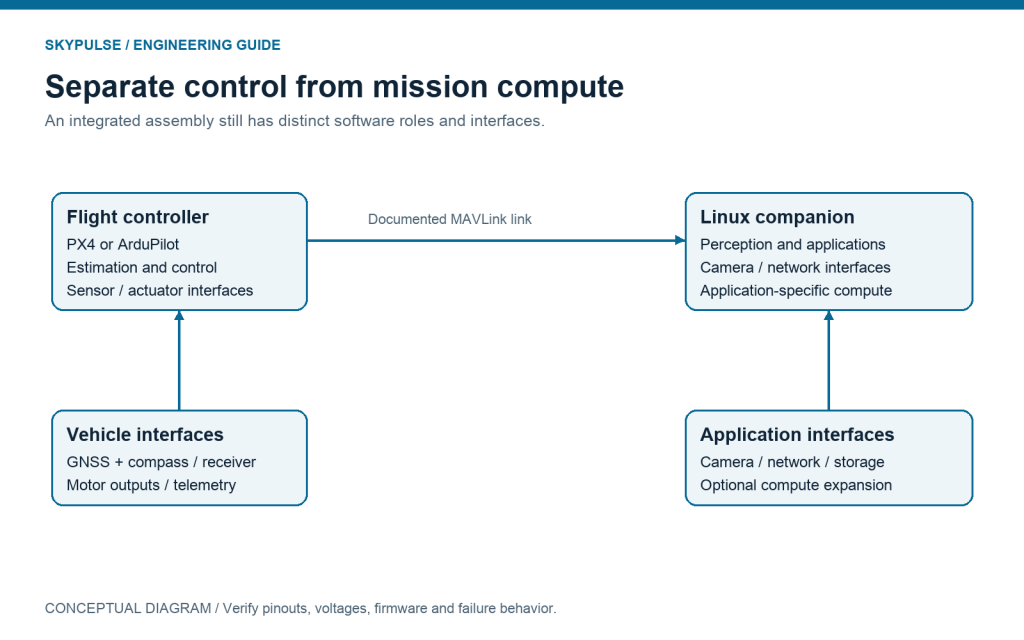
A flight controller is the hardware responsible for sensing and control interfaces; autopilot firmware implements estimation, control, navigation and vehicle-management behavior. A companion computer is a separate compute environment used for applications such as perception, planning, logging or networking. These roles may occupy separate boxes or a shared assembly, but they should remain distinguishable in your architecture.
PX4 and ArduPilot are software ecosystems, not interchangeable names for a board. Pixhawk refers to a hardware-standard ecosystem and related products, not a particular firmware release. A Linux application running OpenCV does not automatically become the flight controller, and a flight controller running navigation firmware does not automatically provide the compute environment needed for a vision model.
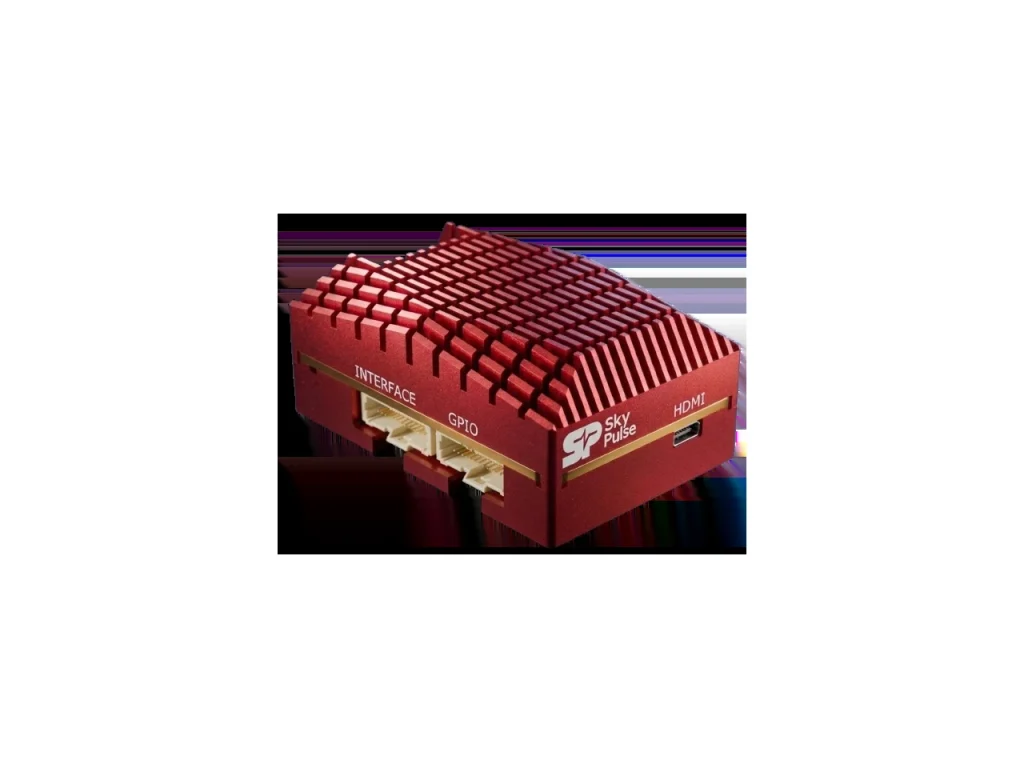
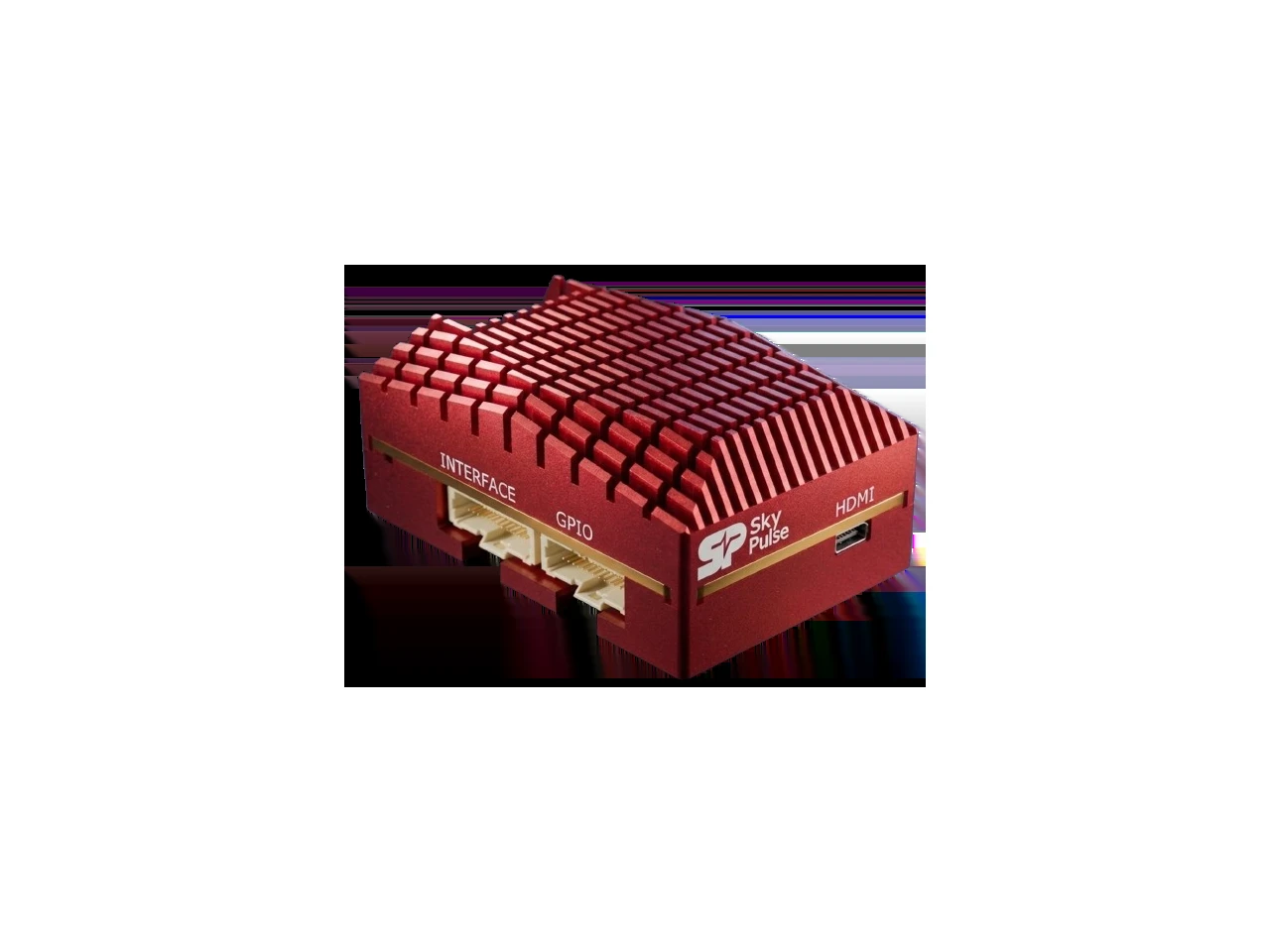
Helios combines a sensor-redundant flight controller with a Raspberry Pi Compute Module 5 companion computer. SkyPulse documents the connection between those two roles through the flight controller’s UART4/Serial 3 and the companion’s /dev/ttyAMA0. Integration reduces the need to assemble those functions from unrelated modules, but it does not remove their software or failure boundaries. Source: Helios specification; companion setup guide.
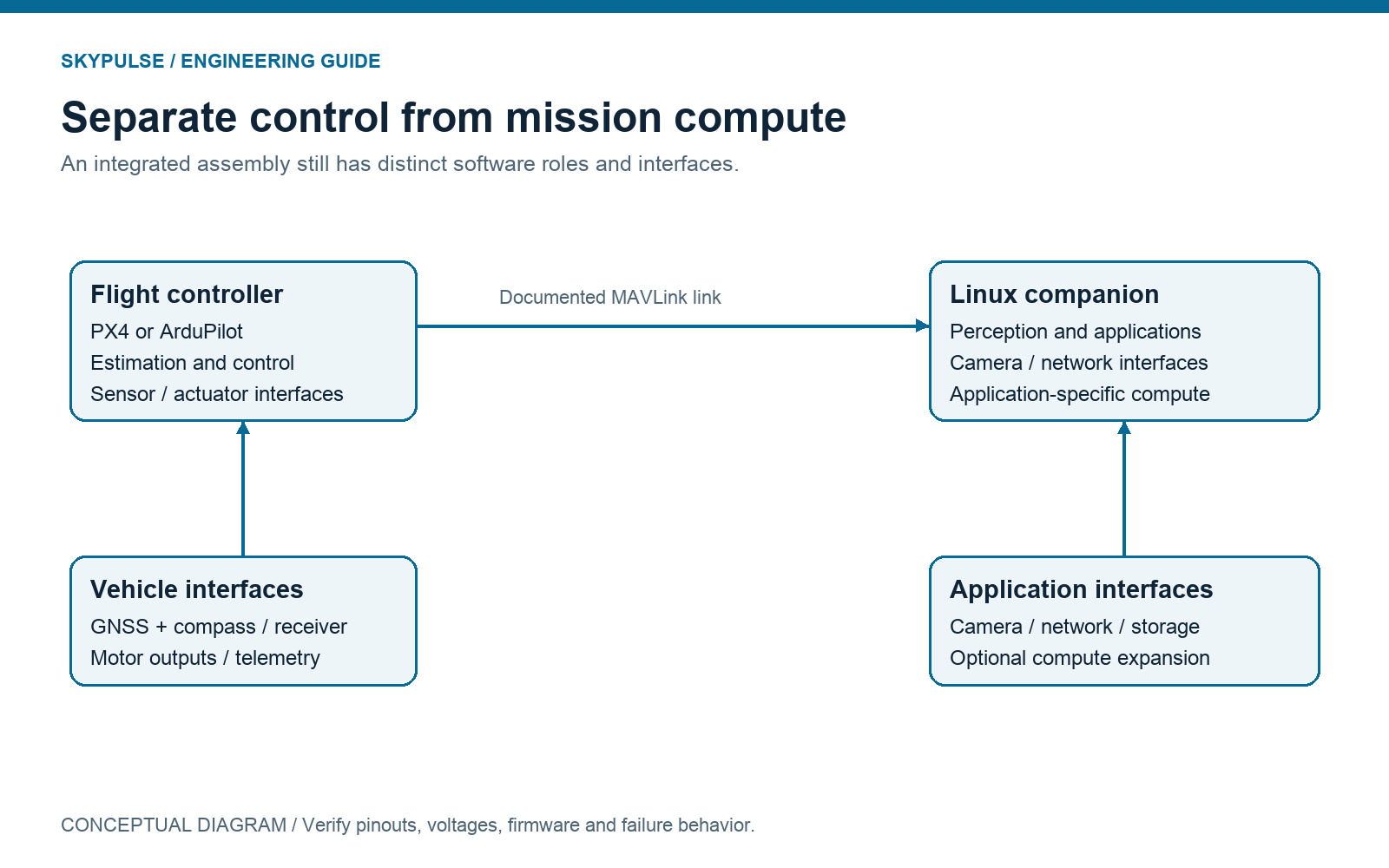
Define which computer owns each decision. The autopilot should have a specified response when companion messages stop, arrive late or contain unusable data. The companion should detect a disconnected controller and handle that state explicitly. A shared mechanical enclosure does not establish that behavior; it must be configured and validated in the chosen firmware and application.
3. Verify firmware support before you compare processors
Support means more than a manufacturer saying that a board can run PX4 or ArduPilot. Identify the exact board revision, firmware target, release, bootloader and recovery procedure. Then determine whether the required drivers and features exist in that configuration. A working image supplied by a manufacturer and an upstream-supported reference target are different support arrangements.
SkyPulse states that Helios supports ArduPilot and PX4, ships with ArduCopter by default, and can be flashed with PX4 through USB. Those are manufacturer-documented capabilities. This article does not claim that Helios has independent certification or the same upstream maintenance classification as a PX4 reference platform. Obtain the current image and revision-specific instructions before selecting a release. Source: Helios firmware compatibility.
PX4 documents the Pixhawk 6X and 6C and identifies them as supported by its maintenance and test teams. ArduPilot’s hardware directory documents many boards, including Cube Orange/+ and Holybro products. Use those pages to check the actual target rather than assuming that support transfers across similar product names. Orange and Orange+, for example, should not be treated as the same firmware identifier without checking the relevant release. Pixhawk 6X; Pixhawk 6C; ArduPilot hardware directory.
Also check software capacity. ArduPilot notes that some boards omit features to fit available firmware memory and documents options for custom builds. A compatible processor family is therefore not evidence that every feature is included. Record your required functionality—such as the sensor driver, actuator protocol, scripting or communications feature—and verify it in the chosen build. Source: firmware limitations.
For a maintainable deployment, keep a configuration record containing firmware version, image checksum, parameters, calibration state, companion OS and application versions. Document how to restore a known-good configuration. Test updates on the evaluation platform before a production vehicle. The value of good documentation is not merely faster setup; it is the ability to explain and reproduce the system months later.
4. What do redundant IMUs actually give you?
Multiple IMUs provide additional measurements that firmware can compare or select, but they do not make an aircraft immune to failure. The effectiveness of redundancy depends on sensing, power, buses, mounting, temperature, estimator behavior and the conditions you validate. Three sensors exposed to the same mechanical or electrical disturbance can still experience a common problem.
The Helios specification lists three onboard IMUs, an onboard compass and a barometer. PX4 describes the Pixhawk 6X with three IMUs and two barometers on separate buses, including isolated sensor power domains. The Pixhawk 6C page lists two accelerometer/gyro devices; it should not be described as having the same triple-IMU architecture. ArduPilot documents three IMUs and temperature-controlled sensing in the Cube Orange/+ family. These distinctions are meaningful and should not collapse into a generic “industrial-grade” label. Helios; 6X; 6C; Cube Orange/+.
Ask what is redundant and what remains shared. Are there separate sensor buses or supplies? Does the documentation describe thermal control? Which failure cases can the estimator detect? What logging exposes sensor disagreement? A shared processor, connector, power source or enclosure can remain a system-level single point of failure even when multiple IMUs are present.
Mounting and vibration are integration issues, not specification-table details. Inspect the manufacturer’s mounting recommendations and assess the actual vehicle vibration environment. Motors, propellers, frame resonances and cabling can influence the measurements. Evaluate logs from representative conditions and loads rather than assuming the presence of vibration isolation eliminates the need for validation.
Finally, distinguish redundancy from certification. A board may have redundant sensors without being certified for a particular operation or reliability level. Define the evidence your project needs: supported failure responses, test records, supply-chain documents and revision control. This guide explains architectures; it does not assign a safety certification to any product.
5. Build an interface budget before the wiring harness
List every connected device and its interface before ordering the controller. Count GNSS, receiver, telemetry, ESC telemetry, airspeed, rangefinder, payload control, camera connections and the companion link. Then reserve capacity for diagnostics and foreseeable expansion. Advertised port counts are only a starting point because some interfaces may already serve onboard functions.
SkyPulse lists six UARTs, two CAN buses, three I²C interfaces and eight motor outputs for Helios. Its serial mapping identifies UART4/Serial 3 as the companion connection. Count that link in your budget instead of assuming every serial interface is unused. The companion’s USB, Ethernet, camera and PCIe interfaces are a separate set of resources, with their own connector and software constraints. Source: Helios interfaces and serial mapping.
| Function | Interface to evaluate | What to record |
|---|---|---|
| GNSS and compass | Receiver-supported UART plus I²C, or a documented CAN device | Pinout, voltage, orientation, firmware driver and update rate |
| Companion communication | Documented MAVLink serial or network link | Port ownership, baud rate, message rates and disconnect response |
| Telemetry radio | Supported serial or companion-network interface | Throughput, power, latency and recovery behavior |
| Motors and actuators | Supported output groups and ESC protocols | Channel allocation, timer grouping, signal levels and telemetry requirements |
| Camera and perception | Companion camera, USB or network interface | Drivers, bandwidth, synchronization and compute budget |
Check connector compatibility electrically. A familiar housing does not prove that supply, ground and signal pins align. SkyNav is documented as using a Pixhawk/Cube-compatible pinout, but you should still check the receiver variant and the host port. The Helios connector groups have their own documentation; do not apply a Pixhawk cable assumption to every connector in the system. Source: SkyNav documentation.
Separate interface count from interface performance. A usable serial port must provide sufficient bandwidth for the configured stream; a CAN device needs a supported protocol and appropriate wiring; a camera interface needs a usable software driver. Keep a port-assignment table with the harness design. It becomes the reference for assembly, troubleshooting and future revisions.
6. Compare power, cooling and the installed system
Compare the complete avionics assembly, not the lightest number on a product page. Installed mass includes the controller, carrier, companion computer, heatsink, power conditioning, GNSS, adapters, enclosure and harness. Likewise, power demand includes startup, radio transmission, camera operation and peak compute load—not just the controller at idle.
SkyPulse’s documentation describes Helios as combining flight control and companion compute, and provides load-dependent power figures. Those figures are useful for planning, but they are not a measurement of your software, camera and radio configuration. This guide deliberately does not publish a universal Helios mass or input-voltage range because current public pages use different figures and configurations. Confirm the current revision and installed configuration with engineering before designing the power source or comparing mass. Hardware documentation; current support information.
A high advertised maximum voltage is not permission to connect every battery directly. Consider transients, filtering, wiring polarity, protection and the manufacturer’s operating conditions. SkyPulse explicitly discusses additional protection for an 8S connection and warns that battery-sense inputs are not general power inputs. Apply those instructions to the current unit rather than deriving a wiring decision from a headline voltage. Source: Helios power and sensing warnings.
Thermal behavior is part of the compute decision. Select an application workload and observe performance under the enclosure, airflow and environmental conditions the vehicle will actually encounter. A companion computer that meets a benchmark briefly may behave differently under sustained load. Verify temperatures, sustained processing, message timing and supply behavior together, particularly when flight control and compute occupy the same mechanical assembly.
Use a complete bill of materials for price comparisons too. Include the GNSS receiver, carrier, companion storage, connectivity adapters and required power hardware. Avoid comparing a bare autopilot module price to an integrated evaluation stack. Prices and stock change; use the live catalog or dated quotations instead of hard-coding competing vendors’ prices into a long-lived guide.
7. Helios, Pixhawk, Cube and CM4/CM5: compare architectures fairly
These options solve overlapping but different integration problems. A dedicated controller is not incomplete because it lacks Linux compute, and an integrated controller is not automatically better because it includes it. Choose the boundary between flight control and mission computing deliberately, then compare the components needed to implement that boundary.
| Option | Sensing and compute | Useful selection question | Primary source |
|---|---|---|---|
| SkyPulse Helios FMU | Three documented onboard IMUs; flight controller plus Raspberry Pi CM5 companion in one assembly | Does an integrated CM5 system meet your workload, interface and service requirements? | SkyPulse specification |
| Holybro Pixhawk 6X | Dedicated autopilot; three IMUs and two barometers with documented separate sensor domains; carrier options | Do its reference-platform support and modular carrier choices fit the project? | PX4 documentation |
| Holybro Pixhawk 6C | Dedicated autopilot; two documented accelerometer/gyro devices; no Linux companion included in the controller | Are its interfaces and documented sensor arrangement sufficient without a larger modular assembly? | PX4 documentation |
| Cube Orange+ | Autopilot module and carrier ecosystem; three IMUs, with documented vibration isolation and temperature control | Do the selected carrier and exact firmware image provide the functions you need? | ArduPilot documentation |
| Holybro Pixhawk RPi CM4/CM5 baseboard | Carrier combining a compatible Pixhawk flight-controller module with Raspberry Pi companion computing | Does the modular module/carrier/compute combination fit your packaging and lifecycle plan? | Holybro overview |
Holybro’s CM4/CM5 baseboard is especially relevant when evaluating Helios. Its documentation describes a compact flight-controller/companion arrangement with an internal TELEM2 connection, compatibility with the Pixhawk Bus Standard and an Ethernet connection option. Therefore, “flight control and Raspberry Pi in one assembly” is not a unique category claim for Helios. Compare the actual connector access, delivered configuration, thermal design, support and installed components. Source: Holybro CM4/CM5 overview.
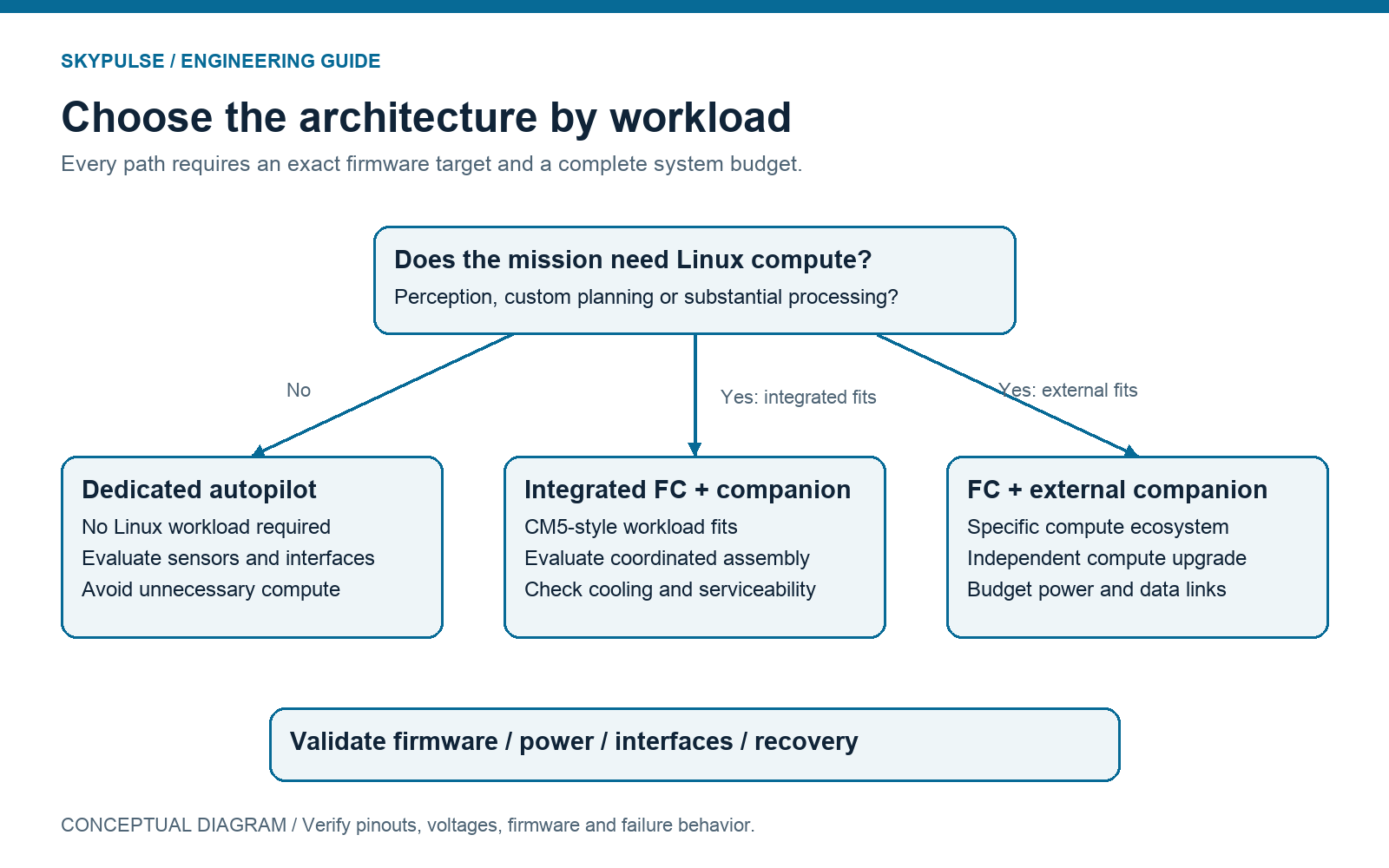
The right shortlist may contain two different architectures rather than two superficially similar boards. For example, evaluate an integrated Helios configuration against a Pixhawk with a separately chosen companion if the workload is uncertain. Evaluate a modular carrier if field replacement or custom I/O dominates. Record which requirements each candidate meets, which remain open and what evidence will close them.
8. When should you consider Helios?
Consider Helios when you want PX4/ArduPilot flight-control capability together with a Linux companion environment and prefer to evaluate them as a coordinated assembly. SkyPulse documents a Raspberry Pi CM5 with eMMC options, camera and network interfaces, and PCIe connectivity. This makes it a relevant candidate for development involving perception, onboard data processing or custom robotics applications. Source: Helios compute specification.
Compatibility with packages such as OpenCV, TensorFlow or ROS should be interpreted as an application-development capability, not proof that your model meets a specific latency, frame-rate or accuracy target. The ability to connect an accelerator is also different from an accelerator being included. Verify the SKU, hardware interfaces, operating system, drivers and sustained workload before promising a capability to a customer.
A separate companion may be preferable when your application depends on a particular accelerator ecosystem, needs substantially different compute capacity, or must be upgraded independently of the flight-control hardware. A dedicated controller without a companion may be preferable when the mission requires no Linux workload. A modular carrier can be preferable when an OEM needs its own connector layout or replaceable module architecture.
SkyPulse states that its catalog hardware is NDAA compliant and directs customers to engineering for compliance documentation. Treat this as a manufacturer claim supported by the documents supplied for the exact procurement. It is not a substitute for a customer’s own program requirements, and this guide does not characterize competitors’ compliance without their corresponding evidence. Source: SkyPulse support and compliance FAQ.
9. An example Helios, SkyNav and Breakout Board evaluation stack
A practical evaluation stack needs a controller, a navigation module and a way to access companion compute. SkyPulse’s Evaluation Kit combines Helios FMU, SkyNav Standard and the Breakout Board. The kit is a documented starting configuration, not a complete aircraft and not a substitute for power, harness, actuator and firmware validation. Evaluation Kit; kit FAQ.
SkyNav provides navigation-module options with a compass and a documented Pixhawk/Cube-compatible pinout. Choose Standard or Pro RTK according to the project’s actual positioning requirement. RTK performance depends on the complete corrections, reception and integration setup; buying an RTK-capable module alone does not establish centimeter-level performance in every environment. Use the variant-specific receiver documentation rather than assuming that all SkyNav variants behave identically. Source: SkyNav module documentation.
The Breakout Board exposes access to the companion through Ethernet and USB. SkyPulse documents a 20-pin Interface connection, Gigabit Ethernet RJ45, and a USB Type-C port whose host/device mode is selected by a switch. Verify that mode before connecting for flashing or peripheral operation. A connector that is mechanically correct can still be configured for the wrong role. Source: Breakout Board documentation.
Begin evaluation on a bench with propellers removed, the current pinout open and the supply checked. Establish companion access, confirm the flight controller identity and record the starting software versions. Then verify the navigation module, receiver, outputs and telemetry individually. Integration proceeds more predictably when each interface has an observable acceptance test before the full system is assembled.
10. Verify the internal MAVLink link before running autonomy software
First prove basic communication between the companion and the flight controller. SkyPulse’s getting-started guide maps the companion’s /dev/ttyAMA0 to the flight controller’s UART4/Serial 3. It recommends MAVLink 2 and a 921600-baud link for this connection. Verify the same rate at both ends and confirm the port is not already owned by another process. Source: Helios getting-started guide.
In the ground-control interface, select the appropriate MAVLink 2 protocol and baud-rate option for Serial 3 using the current ArduPilot parameter documentation. Parameter storage values can differ from their human-readable labels; do not enter a raw number merely because it appears in a tutorial. The companion command below uses a baud rate in bits per second.
# Documentation example; not executed or tested on hardware for this article.
# Requires the MAVProxy installation described in the SkyPulse guide.
~/.local/bin/mavproxy.py --master=/dev/ttyAMA0 --baudrate=921600
The guide describes a successful connection message similar to Detected vehicle 1:1 on link 0. Seeing a vehicle establishes basic communication; it does not validate estimator quality, application timing, navigation performance or loss-of-link behavior. Record the connection result, then introduce application-specific streams and observe whether timing and logging remain acceptable.
If communication fails, work from the simplest explanation outward: confirm the device node, permissions, serial-port assignment, firmware protocol, baud-rate match and competing processes. A valid link can also become overloaded by unnecessarily high message rates. Set the streams your application needs and assess the shared bandwidth rather than enabling every available message.
Before moving to autonomous application behavior, define what happens when the companion restarts, loses connectivity or cannot produce usable results. Configure the chosen firmware and application accordingly and validate on the appropriate test platform. This article provides a documentation-based integration path; it does not claim that a particular autonomy stack or flight behavior has been tested.
11. Common integration mistakes and a selection checklist
The most expensive selection mistakes often occur outside the processor comparison. Buying before checking the firmware target, forgetting the companion’s thermal load, assuming an interface is free, or comparing bare-module prices can force a redesign after the harness and enclosure exist. A short evidence checklist prevents these assumptions from becoming hidden requirements.
- Mission: Document vehicle, payload, operating environment and required behavior.
- Firmware: Confirm exact board revision, release, target, required features and recovery procedure.
- Sensing: Record IMUs, shared resources, mounting requirements, calibration and log evidence.
- Interfaces: Allocate every peripheral, including internal companion links and diagnostic access.
- Electrical: Check pinout, signal levels, polarity, input conditions, transients and protection.
- Compute: Verify camera drivers, storage, model/software dependencies and sustained workload.
- Thermal: Evaluate the installed enclosure and airflow, not an open-bench assumption.
- System bill of materials: Include carriers, GNSS, companion, cooling, adapters, power and harness.
- Failure response: Define companion-loss, sensor-health and communications acceptance tests.
- Lifecycle: Record vendor support, replacement strategy, configuration backups and revision control.
Download the two-page flight-controller selection checklist (PDF). The checklist is also represented above in accessible text; the downloadable version adds spaces to record requirements and evidence.
A useful purchasing decision should be explainable in one paragraph: the selected configuration satisfies the mission’s firmware, sensing, interfaces and compute needs, with documented open questions and acceptance tests. If the justification is simply that a board is popular or has a faster chip, the comparison is probably not complete.
Turn the shortlist into an acceptance plan
Compare candidate configurations against the same mission requirements, not different demonstration workloads. Record the firmware image, configuration, peripheral inventory, enclosure and companion application for each candidate. Define what constitutes a usable navigation solution, an acceptable communication delay and a recoverable companion restart before collecting results. Those thresholds belong to your vehicle and application; this guide does not prescribe universal flight-safety limits.
Separate documentation checks from measurements. A documented CAN port establishes an interface capability, while a successful bench connection establishes behavior for one tested configuration. Neither alone demonstrates behavior during flight, across temperature extremes or under an electrical disturbance. Preserve that distinction in the evaluation record so a purchasing decision does not silently become a claim of complete qualification.
Use a staged process: review specifications and pinouts, perform propeller-free electrical and communications checks, evaluate sustained application load in the installed enclosure, and proceed to vehicle testing only under your organization’s appropriate procedures. Record unresolved questions as explicit release gates. If a specification conflict affects wiring, protection, packaging or a procurement requirement, ask the manufacturer to resolve it for the actual revision rather than choosing the most convenient number.
12. Frequently asked questions
Is Pixhawk the same as PX4?
No. PX4 is an autopilot software ecosystem; Pixhawk is associated with hardware standards and a family of flight-controller products. Select firmware and hardware together, checking the exact target and release. A Pixhawk name alone does not specify the software configuration.
Can Helios run both PX4 and ArduPilot?
SkyPulse documents support for both and states that Helios ships with ArduCopter by default. Use the manufacturer’s current image and instructions for the unit’s revision. This is a manufacturer support statement, not a claim of independent certification or identical upstream support across all releases.
Do I need a companion computer for autonomous waypoint flights?
Not necessarily. A supported autopilot can implement navigation functions without a general-purpose Linux workload. Add companion compute when your application requires capabilities such as perception, custom planning or substantial onboard processing, and validate how it interacts with flight control.
Does Helios include a Jetson or an AI accelerator?
The documented companion is a Raspberry Pi Compute Module 5, not a Jetson. SkyPulse documents PCIe for expansion, including accelerators. An available expansion interface does not mean an accelerator is supplied with every product; check the purchased configuration.
Are three IMUs enough to guarantee mission reliability?
No. Redundant measurements are one part of the architecture. Shared power, buses, vibration, temperature, software and other components can still affect the system. Define reliability requirements and validate the entire installed configuration.
Can SkyNav be connected to a Pixhawk or Cube controller?
SkyPulse documents a Pixhawk/Cube-compatible pinout. Confirm the host port, receiver variant, voltage and firmware driver before connecting. Mechanical fit alone is not the acceptance test for an electrical interface.
Which configuration should I evaluate first?
Start with your firmware and interface worksheet. If integrated flight control plus CM5 compute fits the mission, consider the Helios Evaluation Kit. If compute requirements or carrier design dominate, evaluate an appropriate modular or external-compute architecture alongside it.
Sources, evidence and next steps
This guide was prepared from public manufacturer and project documentation reviewed on 2 October 2026. It includes engineering recommendations, not comparative benchmark results. Hardware revisions, firmware support and catalog configurations change; check the linked sources before a purchase or wiring decision.
- SkyPulse Helios FMU: hardware, interfaces and firmware statements.
- Helios getting started: companion access and MAVLink connection.
- SkyNav GNSS module documentation.
- SkyPulse Breakout Board documentation.
- SkyPulse support FAQ: configuration and manufacturer compliance statements.
- PX4 Flight Controller Selection.
- PX4 Holybro Pixhawk 6X documentation.
- PX4 Holybro Pixhawk 6C documentation.
- ArduPilot Choosing an Autopilot and firmware limitations.
- ArduPilot Cube Orange/+ overview.
- Holybro Pixhawk RPi CM4/CM5 baseboard overview.
Ready to evaluate a configuration? Browse the public documentation, explore the SkyPulse Evaluation Kit, or talk to an engineer with your firmware, interface and compute requirements. A concrete requirement list is the fastest route to a useful integration conversation.